Intro:
A plugin that allows the developer to create in-text information.
This plugin creates the ASK system like in the game Wild Arms 3.
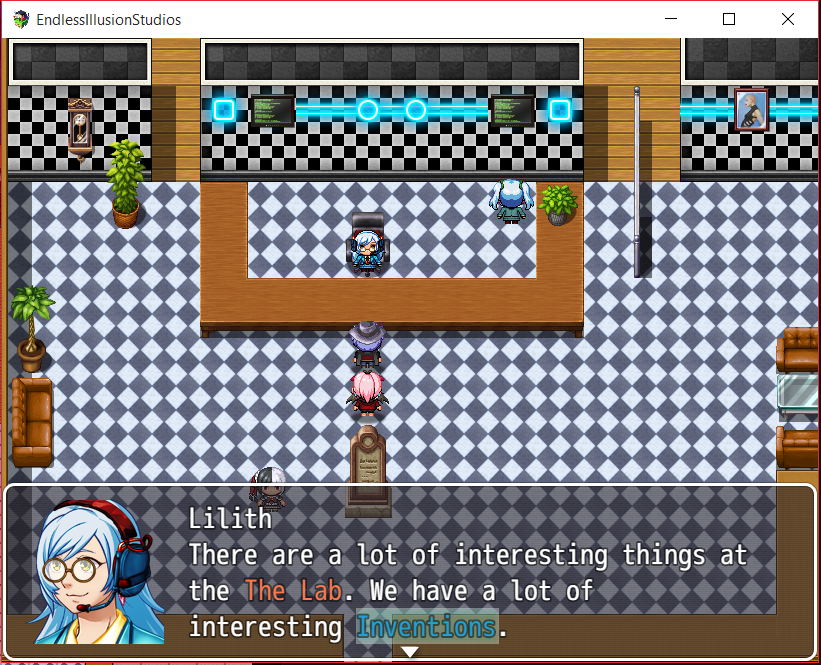
It allows you to select text within a message window, and ask about that word or phrase.
Version: 1.03
ChangeLog:
- Small fix for multiple windows without clearing the list of words.
- Deselecting text is now done using the cancel button when a window has special keyword text.
- When you reach the end of the input, it goes back to the original starting position (first word in the list)
- Indexes are no longer zero based, so the first word would be KR.AskManager.isWordSelected(1).
Features:
- Movement controls inside a message window
- Selecting text within a message window
- Activating conditional branches based on selected text.
- Option to remove brackets, and proper selection rectangle with other text codes.
- You can have multiple windows one after another with a lot of definitions and still access them the same way.
For example: One window with 1 word, and another with 2 or three after (The selection rectangle will adjust to the words in the following window).
Instructions:
- Install the script with the same name: EISASKSystem.js (default name).
- Have fun!
Video
/* Setup - Creating Context Word / Phrase
* To create a context word use:
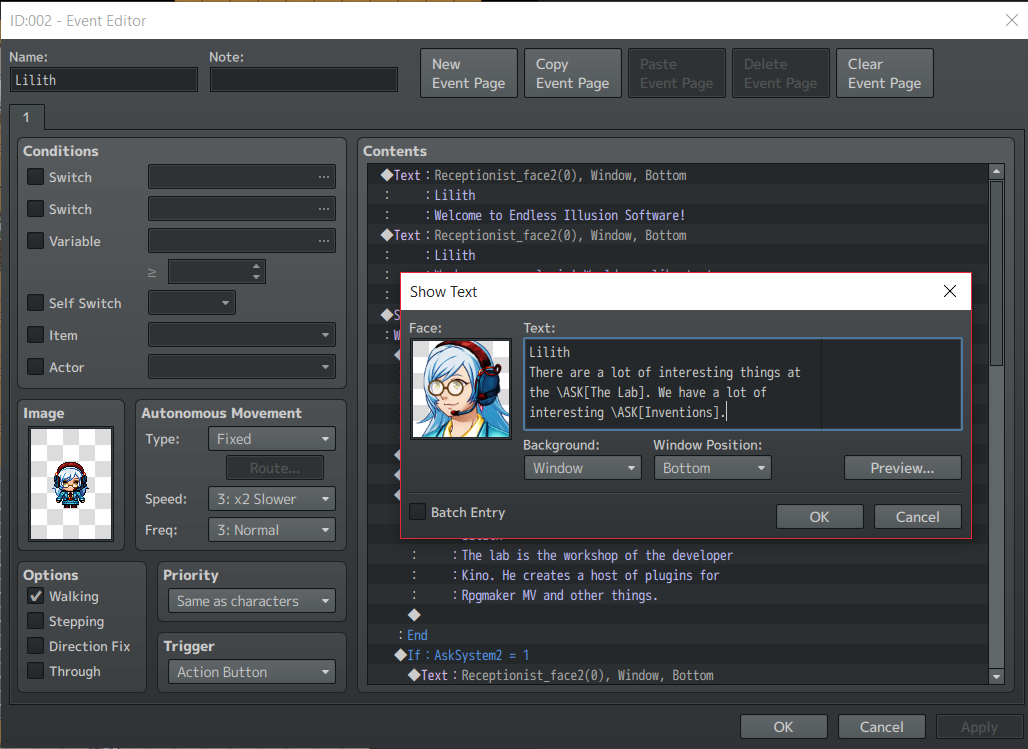
* \ASK[ Word or phrase you want to ask ] within the message window.
* These words can then be selected with the arrow keys.
* Right / Down advances the pointer, left / up moves backward.
*
* Functions
* KR.AskManager.isWordSelect(index)
* -Each word is indexed from 0 to maximum words in the plugin once it appears in
* a message window. You can then assign them to game variables to do conditional
* branching. This function checks if the word has been selected or not.
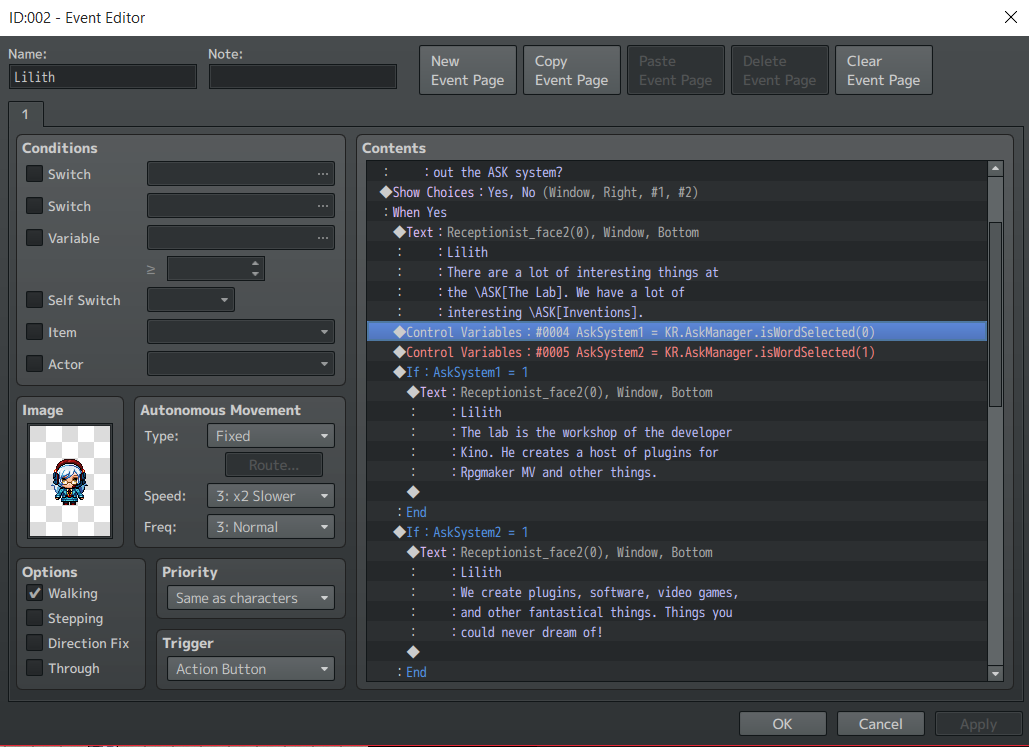
* Example: KR.AskManager.isWordSelected(0)
*
* KR.AskManager.clearWorldList()
* - This script call clears the world list. This is to give the developer
* better control over when the word list should be cleared. For example,
* to evaluate the conditional branch after the word once the message window
* closes.
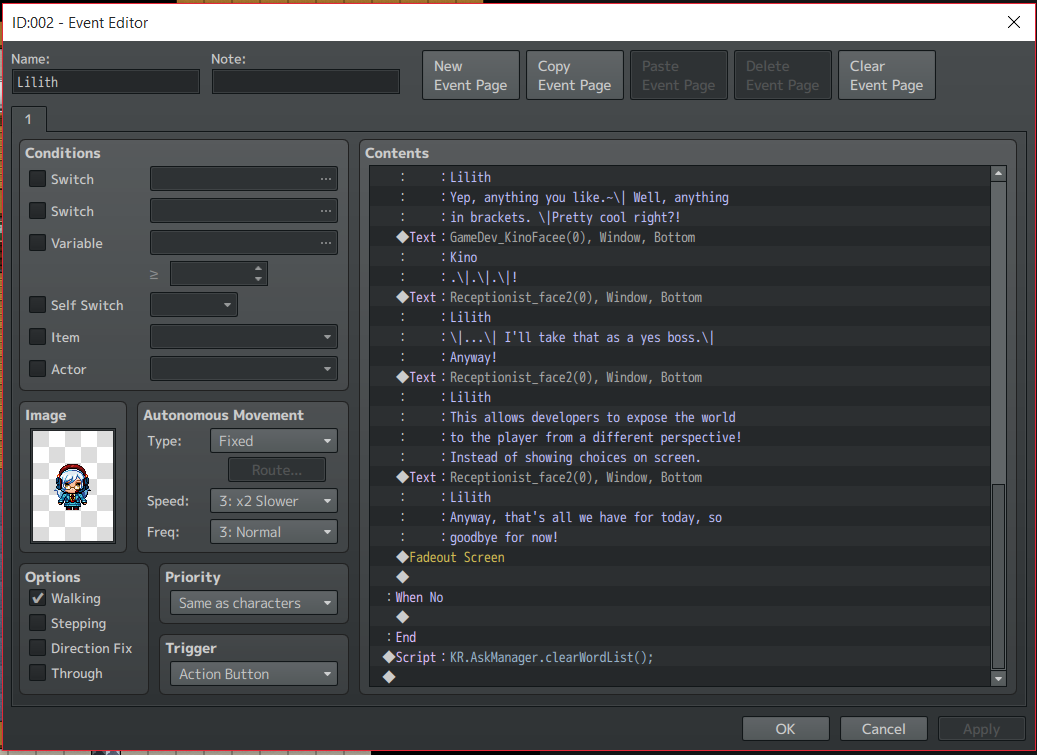
* Example: KR.AskManager.clearWordList();
*/
Setup Example Windows:
Spoiler
Setting up ASK in event window:
 Passing selected information to control variables:
 Clearing the word list before exiting the event window:
 In-game screenshots
Spoiler
 Please download the attached file to use the plugin.
View attachment EISAskSystem.js
Credits:
Free for both commercial and non-commercial use.Credit with the name Kino or EIS.
Please download the attached file to use the plugin.
View attachment EISAskSystem.js
Credits:
Free for both commercial and non-commercial use.Credit with the name Kino or EIS.
Thanks:
Thank you to anyone who decides to use this script; I appreciate it!
If there are any bugs/issue, please contact me via message on the forums. I want to try and make the script as extensible/flexible as possible, so if you have an ideas also
please message me.
Enjoy ~
本贴来自国际rpgmaker官方论坛作者:Kino处,因国际论坛即将永久关站,为了存档多年珍贵资料,署名转载到本论坛存档,由于官方帖子为英文原帖,需要中文翻译请点击论坛顶部切换语言为中文就可以将帖子翻译成中文浏览,方便大家随时查看,原文地址:
https://forums.rpgmakerweb.com/threads/eis-ask-system-updated-1-03.63988/
 简体中文
简体中文
 English(英语)
 日本語(日语)
 Deutsch(德语)
 Русский язык(俄语)
 بالعربية(阿拉伯语)
 Türkçe(土耳其语)
 Português(葡萄牙语)
 ภาษาไทย(泰国语)
 한어(朝鲜语/韩语)
 Français(法语)





 EIS ASK System [Updated: 1.03]-2.jpg