I was programming in Python as usual and using GROQ's API, and I thought, why not create something for RPG Maker MZ too? Since I just finished developing my FOW Minimap, I sat down and wrote some quick code.
I'm giving it away here for free, I'm not developing it further. Take it and do whatever you want – MIT License. I made it as a hobby project, it's not a plugin I'll maintain. Here's what this version offers:
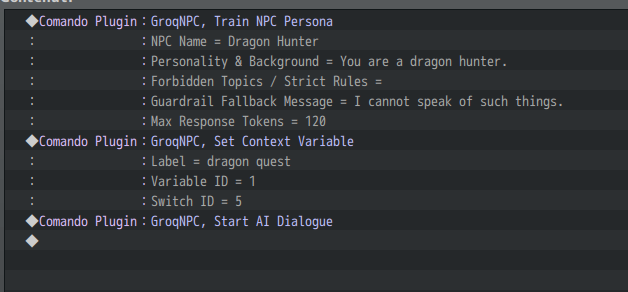
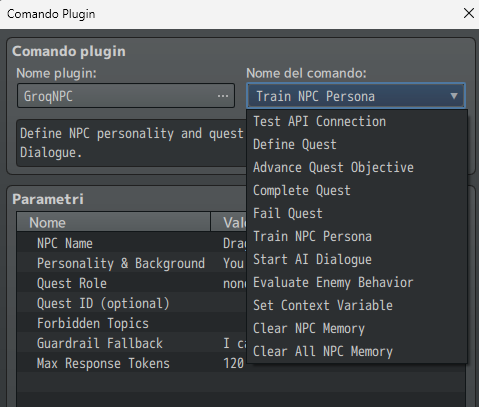
GroqNPC.js – AI-Powered Dynamic NPC Engine for RPG Maker MZ
Version: 2.2.0
License: MIT – do whatever you want with it
Requirements: RPG Maker MZ, Groq API key (free tier available)
What's Inside
This plugin connects your RPG Maker MZ game to
Groq's fast LLM API (Llama 3.1) to deliver four integrated systems:
Layer - Feature - What It Does
1 - AI Dialogue - Streaming conversations with memory, 10s timeout
2 - Quest Machine - Define quests; all NPCs share state automatically
3 - NPC Knowledge - NPCs know quest status, companions, world state
4 - Enemy Behavior - AI decides tactics, sets MZ switches before battle
Quick Start – Dragon Hunt Example
1. Define the quest (in an autorun event)
Code:
2. Train Mark – the quest giver (in his event)
Code:
3. Train a companion (Sera's event)
Code:
4. Enemy behavior – before dragon battle
Code:
Then check switches in your battle event:
- Switch 20 ON → Aggressive (full attack)
- Switch 21 ON → Defensive (guard/buff)
- Switch 22 ON → Flee (escape attempt)
- Switch 23 ON → Reinforce (call allies)
- Switch 24 ON → Enraged (berserk mode)
5. Advance the quest anywhere
Code:
All NPCs linked to dragon_hunt will automatically know the new objective.
Text Formatting (AI → MZ Color Codes)
The AI wraps key words with semantic tags. The plugin converts them to MZ colors:
Tag - Purpose - MZ Color
Code:
- Dangers, warnings, critical info - Red (2)
Code:
- Names, places, items, proper nouns - Yellow (14)
Code:
- Secrets, rare knowledge, confidential - Green (3)
Code:
- Rumors, uncertain info, vague hints - Gray (8)
Example AI response:
Code:
What the player sees:Colored text automatically (yellow for locations, red for warnings, etc.)
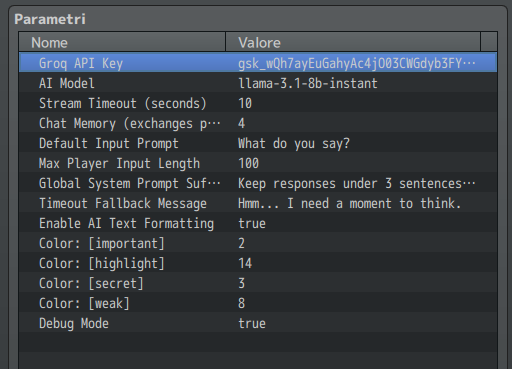
 Plugin Parameters (Configure in Plugin Manager)
Parameter - Default - Description
Code:
Plugin Parameters (Configure in Plugin Manager)
Parameter - Default - Description
Code:
- (Empty) - Get from console.groq.com/keys
Code:
- llama-3.1-8b-instant - Visit HEREfor more
Code:
- 10 seconds - Hard cutoff. Partial text shown if triggered
Code:
- 4 exchanges - How many back-and-forth messages per NPC to remember
Code:
- What do you say? - Fallback when AI doesn't generate a prompt
Code:
- 100 characters - Limits what player can type
Code:
- (Empty) - Appended to ALL NPC prompts. Example: "Keep responses under 3 sentences. Never break character."
Code:
- Hmm... I need a moment to think - Shown when API times out
Code:
- false - Logs full API payloads to F8 console
Complete Plugin Command Reference
Quest Management
Command - Arguments - Description
Code:
-
questId, title, description, objectives (pipe-separated), npcMembers (comma), questSwitch, questVariable - reate/update a quest
Code:
- questId - Mark current objective done, move to next
Code:
- questId - Mark quest as fully completed
Code:
- questId - Mark quest as failed
NPC Persona
Command - Arguments - Description
Code:
- name, personality, role (none/questgiver/companion/merchant/informant), questId, guardrails, fallbackMessage, maxTokens - Define NPC personality. Call BEFORE startDialogue
Code:
- (none) - Begin AI conversation with this NPC
Code:
- (none) - Wipe this NPC's conversation history
Code:
- (none) - Wipe ALL NPC conversation histories
Enemy Behavior
Command - Arguments - Description
Code:
- enemyName, enemyDescription, questId, behaviorSwitchBase, playerHpPercent - AI decides behavior, sets MZ switches
Utilities
Command - Arguments - Description
Code:
- (none) - Verify API key works. Shows result in message window
Code:
- label, variableId or switchId - Expose game state to ALL AI calls globally
️ Notetags (Alternative to Train Persona)
Place these in the
event's Note field:
Code:
Note: Train Persona plugin commands override notetags.
NPC Memory & Knowledge System
What NPCs Know Automatically
- Quest status – all quests linked to them via questId
- Current objective – which step the player is on
- Quest members – names of all NPCs in the same quest
- World state – any variables/switches exposed via setContextVar
- Conversation history – last N exchanges (configurable)
Example: Exposing World State
Code:
Now
EVERY NPC sees this in their system prompt:
Code:
They will react accordingly. A merchant might say:
"I heard you slew the dragon! Take this discount."
Memory Management
- Memory is saved in the save file
- Each NPC has independent memory (by map ID + event ID)
- Use Clear NPC Memory to reset an NPC
- Use Clear All NPC Memory to reset everyone
Enemy Behavior Deep Dive
Behavior Switch Mapping
When you call evaluateEnemyBehavior with Behavior Switch Base: 20:
Switch - Behavior - AI Decides This When
20 -
Aggressive - Player HP is low, enemy has advantage, quest near start
21 -
Defensive - Enemy is wounded, protecting something, buying time
22 -
Flee - Enemy is outmatched, mission objective complete, low HP
23 -
Reinforce - Enemy is alone vs party, quest climax approaching
24 -
Enraged - Quest-specific trigger (e.g., dragon at 30% HP, companion died)
Only ONE switch is ON at a time. Use conditional branches to check them.
Enemy Evaluation Example
The AI receives this system prompt internally:
Code:
Choose ONE behavior: aggressive / defensive / flee / reinforce / enraged
The AI responds with a single word, and the plugin sets the corresponding switch.
Save File Compatibility
The plugin saves the following data automatically:
- _npcMemory – conversation histories
- _trainedPersonas – all trained NPC personalities
- _quests – quest states (status, current objective)
- _ctxVars – exposed context variables
No special handling needed. Save and load normally.
 Limitations & Warnings
Issue - Detail
API key visibility - Client-side calls mean the API key is visible in player's browser. Obfuscation possible but not implemented.
Limitations & Warnings
Issue - Detail
API key visibility - Client-side calls mean the API key is visible in player's browser. Obfuscation possible but not implemented.
Internet required - Game won't work offline for AI features. Regular MZ gameplay unaffected.
API costs - You pay for usage. Groq is very cheap (~$0.0002 per dialogue) but not free.
Steam policy - Must declare AI-generated content in your store listing.
No ongoing development - I made this for fun. It works as-is. I won't fix bugs or add features.
Troubleshooting
"API key is empty" error
- Check Plugin Manager → GroqNPC → Groq API Key
- Key should start with gsk_
- No spaces before or after
Timeout errors
- Increase Stream Timeout parameter (10-15 seconds recommended)
- Switch to llama-3.1-8b-instant model (faster)
No response or weird formatting
- Enable Debug Mode and check F8 console
- Verify your Groq account has credits
- Test with testApiKey plugin command
NPC doesn't remember quest
- Ensure Quest ID matches exactly (case-sensitive)
- Call trainPersona BEFORE startDialogue
- Check that the quest was defined (run defineQuest first)
License & Credits
MIT License – do literally anything you want.
- No credit required (but appreciated)
- No warranty
- No support
Built with:
Final Words
That's it. Take it, break it, fix it, improve it, sell games with it.
If you make something cool, I'd love to see it. If you don't, that's fine too.
Enjoy!
↓FULL CODE ↓
Spoiler JavaScript:
本贴来自国际rpgmaker官方论坛作者:Rpx处,因国际论坛即将永久关站,为了存档多年珍贵资料,署名转载到本论坛存档,由于官方帖子为英文原帖,需要中文翻译请点击论坛顶部切换语言为中文就可以将帖子翻译成中文浏览,方便大家随时查看,原文地址:
https://forums.rpgmakerweb.com/threads/ai-dialogue.183612/
 简体中文
简体中文
 English(英语)
 日本語(日语)
 Deutsch(德语)
 Русский язык(俄语)
 بالعربية(阿拉伯语)
 Türkçe(土耳其语)
 Português(葡萄牙语)
 ภาษาไทย(泰国语)
 한어(朝鲜语/韩语)
 Français(法语)





 AI Dialogue: AI Dialogue-4.png