Random Enemy Names (and/or Pronouns)

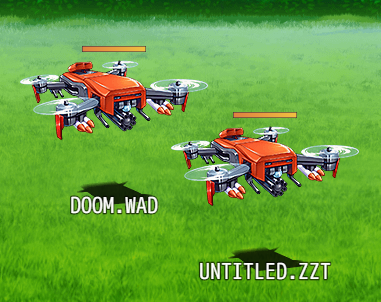
While working on my own major game project this part quickly got complex so I made it into its own plugin. You too can take advantage of randomly named enemies for extra flair! Optionally, you can even give them random pronouns too.
How to Use
Add the .js file to your project's js/plugin folder, then open up the plugin manager in the editor and add the plugin.
There's general help to the side and specific settings help if you double-click on them. The plugin needs to know what text files to load the names from - if you look at the example project, some default text files are provided. The game looks for these in your project's /data folder.
Once you've added the plugin, simply add any of these tags to an Enemy in the database:
- <NamePool: x> pulls a random name out of the file named x (expects a file extension, eg <NamePool: humans.txt>)
- <NamePool: any> pulls a random name out of any of the name text files defined in the plugin settings!
- <PronounPool: x> pulls a random pronoun set out of the file named x (expects a file extension, eg <PronounPool: goblin-pronouns.txt>)
- <PronounPool: any> pulls a random pronoun set out of any of the pronoun text files defined in the plugin settings!
- <NoDefaultName> the default formatting is ENEMYTYPE + CUSTOMNAME + PRONOUNS (eg Goblin Jasmine (she/her)). This tag means this enemy type won't prefix their names with the default enemy name.
If you don't use a NamePool or PronounPool tag, then that enemy type won't get their name changed or pronouns. If you don't use either tag, you get the default RPG Maker behaviour.
Works with VisuStella's Battle Core as well. Note that since VisuStella Battle Core removes the enemy targeting window which shows all their names, you'll need to set "Show Pronouns Everywhere" to true in the plugin settings to see the pronouns appear. By default the pronouns are only shown on the default target selection window. If you're a coder, you can check the plugin file's description for the attribute names to access the data yourself, for instance in Ultra HUD Maker Pro! May be incompatable with other plugins that modify Game_Enemy's name initialisation functions.
 Terms of Use
You can view the license
here. In short, it is free for commercial or non-commercial use. Credit is optional as long as you don't claim it as your own work.
Downloads
You can download the example project
here(includes example text files full of names as well).
You can download just the plugin
here (but you'll need your own text files of names).
You can find the default name files I used for testing
hereif you need them.
本贴来自国际rpgmaker官方论坛作者:LyraVultur处,因国际论坛即将永久关站,为了存档多年珍贵资料,署名转载到本论坛存档,由于官方帖子为英文原帖,需要中文翻译请点击论坛顶部切换语言为中文就可以将帖子翻译成中文浏览,方便大家随时查看,原文地址:
https://forums.rpgmakerweb.com/threads/lyras-random-enemy-names.145755/ 简体中文
简体中文
 English(英语)
 日本語(日语)
 Deutsch(德语)
 Русский язык(俄语)
 بالعربية(阿拉伯语)
 Türkçe(土耳其语)
 Português(葡萄牙语)
 ภาษาไทย(泰国语)
 한어(朝鲜语/韩语)
 Français(法语)





 Lyra's Random Enemy Names-2.jpg